
In 2026, 66% of organizations reportedly use automation in at least one business function, up from 57% the previous year.Workflow automation adoption data That shift changes the executive question. Workflow automation is no longer an experimental way to remove a few spreadsheet tasks. It's becoming part of the operating model enterprises use to control cost, increase throughput, and coordinate decisions across complex systems.
The strongest benefits of workflow automation appear when teams connect applications, operational data, and human judgment instead of automating isolated clicks. Agentic AI can handle non-deterministic routing and exceptions, while a Snowflake-centered data platform can give those agents a consistent foundation for decisions across logistics, energy, telecom, healthcare, and finance.
The New Baseline for Enterprise Operations
Enterprise automation has moved beyond scripts that copy values between screens. Modern workflow automation coordinates triggers, rules, APIs, data transformations, approvals, and exception handling across CRM, ERP, finance, support, and operational platforms. The result is an end-to-end process that can run with limited manual intervention while still escalating decisions that require expertise.
The adoption figure matters because it reframes automation as an operational baseline. The organizations gaining an advantage aren't just buying more tools. They're deciding which workflows deserve automation, which decisions need human review, and how to measure the result after deployment.
Practical rule: Automate the movement of information first, then automate repeatable decisions once the underlying data and controls are reliable.
From task automation to agentic workflows
Traditional task automation works well when the input, rule, and output are predictable. An invoice can be routed according to an approval threshold. A completed sales opportunity can trigger customer creation in an ERP. A support ticket can be assigned based on account, category, and service-level requirements.
Agentic AI extends that model to situations where the workflow must interpret context. An agent might classify an incomplete request, identify the missing information, recommend the next action, and route an exception to the right specialist. That doesn't mean handing an agent unrestricted authority. It means giving it a defined role, approved tools, a bounded data set, and an escalation path.
For smaller teams that need a practical introduction to this model, the guide to practical AI agents for SMEs offers useful context on applying agents to business workflows without beginning with an enterprise-wide redesign.
The outcomes leaders should track
The benefits of workflow automation are clearest when expressed as operating outcomes rather than feature counts:
- Efficiency: Fewer manual handoffs reduce queue time and repetitive coordination.
- Scalability: A well-designed workflow can handle rising volume without requiring every additional transaction to receive another manual touch.
- Reliability: Standardized logic reduces skipped steps, inconsistent routing, and transcription mistakes.
- Visibility: Execution logs reveal where work stalls, fails, or requires human intervention.
- Capacity: Employees can spend more time on judgment-heavy work instead of moving data between systems.
A workflow that only replaces one manual click may be useful, but it rarely changes the economics of an enterprise. The larger opportunity lies in connecting the full business process, including data validation, approvals, downstream updates, monitoring, and recovery.
Quantifying Efficiency and Cost Reductions
The financial case for workflow automation rests on two measurable effects: recovered employee capacity and lower processing cost. Enterprise teams should model both. A workflow that removes manual effort but leaves transaction costs, rework, or downstream reconciliation unchanged may deliver less value than its headline time saving suggests.
Industry research estimates that workflow automation can save employees about 240 to 360 hours per year, free roughly 500 staff-hours annually in mid-sized finance teams, and reduce accounts payable processing to USD 4.98 per invoice, compared with USD 12.44 for bottom-quartile manual processors, a difference of roughly 60% per transaction.Workflow automation time savings Those hours become economically useful when leaders redirect them to customer resolution, exception analysis, process improvement, revenue activity, or other work that software cannot perform effectively.
Capacity is an economic outcome
Finance illustrates the practical trade-off. Automating payment workflows can reduce approval delays, improve visibility into outstanding work, and give finance professionals more time to investigate anomalies. The gain is not fewer administrative actions. It is capacity that can absorb additional volume, strengthen controls, or support analysis without proportional staffing increases.
The per-transaction difference provides a direct starting point for a business case. Multiply the avoidable cost by annual invoice volume, then subtract implementation, integration, support, data-platform, and governance costs. For Agentic AI workflows, include the cost of permissions, monitoring, human review, and recovery paths. A system that makes recommendations across connected enterprise data still needs clear boundaries around what it may execute.
Measurement areaManual baseline to examineAutomation outcome to calculateStaff capacityHours spent entering, checking, and routing recordsHours redirected to higher-value workTransaction costLabor and rework per invoice or requestCost per completed transactionThroughputItems completed within a service windowAdditional volume handled without proportional staffingQualityCorrections, duplicate records, and failed handoffsRework avoided and process consistency gained
Measure the workflow, not just the tool
A credible ROI model includes more than labor reduction. Measure rework, delayed billing, missed service levels, duplicate data entry, stalled requests, and the management time needed to resolve them. In a Snowflake-centered data architecture, consistent definitions for invoices, exceptions, cycle time, and cost make comparisons across business units more reliable. The platform does not create savings by itself. Savings come from the workflow logic, data quality, adoption, and operating controls built around it.
Independent summaries report average productivity gains of 25% to 30% and reductions in repetitive task load of 60% to 95% for automated processes.Workflow automation productivity data Treat these figures as directional benchmarks, not commitments. Results depend on process stability, integration quality, data completeness, exception volume, and user adoption.
Start with a baseline before changing the workflow. Record cycle time, queue time, touch count, error rate, exception rate, and cost per transaction. After launch, compare the same measures and separate genuine capacity gains from work that has merely shifted to another team.
Execution Speed and Compliance Guardrails
Automation can make a deterministic process dramatically faster. A controlled low-code study reported average task execution falling from 185.35 seconds manually to 1.23 seconds when automated, a reduction of approximately 151 times. The manual process had a 5% error rate, while the automated version recorded zero observed errors.Low-code workflow execution study
That result is most relevant to high-volume, data-bound work. Approvals, routing, validation, data entry, and repeatable exception paths benefit because software removes waiting between handoffs and applies the same control logic each time. It doesn't prove that every enterprise process should run without people.
Speed must sit inside a control path
A fast workflow with weak permissions can spread bad data faster. An AI agent with broad access can make an incorrect decision at a scale that a single employee never could. This is why compliance architecture has to be designed before production deployment, not added after a failure.
A controlled workflow should define:
- Identity: Which user, service account, or agent initiated each action?
- Authority: Which systems and records can the workflow read or change?
- Evidence: What inputs, rules, recommendations, approvals, and outputs must be logged?
- Escalation: Which conditions require human review before the workflow continues?
- Recovery: Can the team pause, replay, reverse, or compensate for a failed action?
- Retention: How long must execution records remain available for audit and investigation?
Organizations working with GDPR, HIPAA, or SOX obligations face particular exposure around data access, integration security, and auditability.Workflow automation governance risks The right response isn't to avoid automation. It's to treat every integration and agent permission as part of the control environment.
Agentic AI needs stricter boundaries
A deterministic rule can be tested against known inputs and expected outputs. An agent may interpret language, select a tool, or propose a path based on context. That flexibility is useful for triage and exception handling, but it requires additional safeguards.
Keep the system of record authoritative. Store source data in governed platforms, expose only the fields an agent needs, and require structured outputs where downstream systems depend on predictable formats. Use confidence thresholds and human approval for high-impact decisions. Monitor not only whether a workflow completed, but also whether it made the right decision and whether the data it used was current.
Governance principle: The more discretion an agent receives, the more explicit its permissions, evidence requirements, and rollback procedures must become.
Speed is valuable when it improves service levels without weakening accountability. In regulated operations, the winning design is not “fully autonomous.” It's a workflow that completes routine work quickly, surfaces uncertainty clearly, and leaves an inspectable record of every important action.
Industry Applications and Data Architecture
The practical value of workflow automation becomes clearer when the workflow touches physical assets, field operations, or large volumes of time-series data. A Snowflake-centered architecture can consolidate operational events, telemetry, customer records, and historical context so automation logic doesn't depend on disconnected application databases.
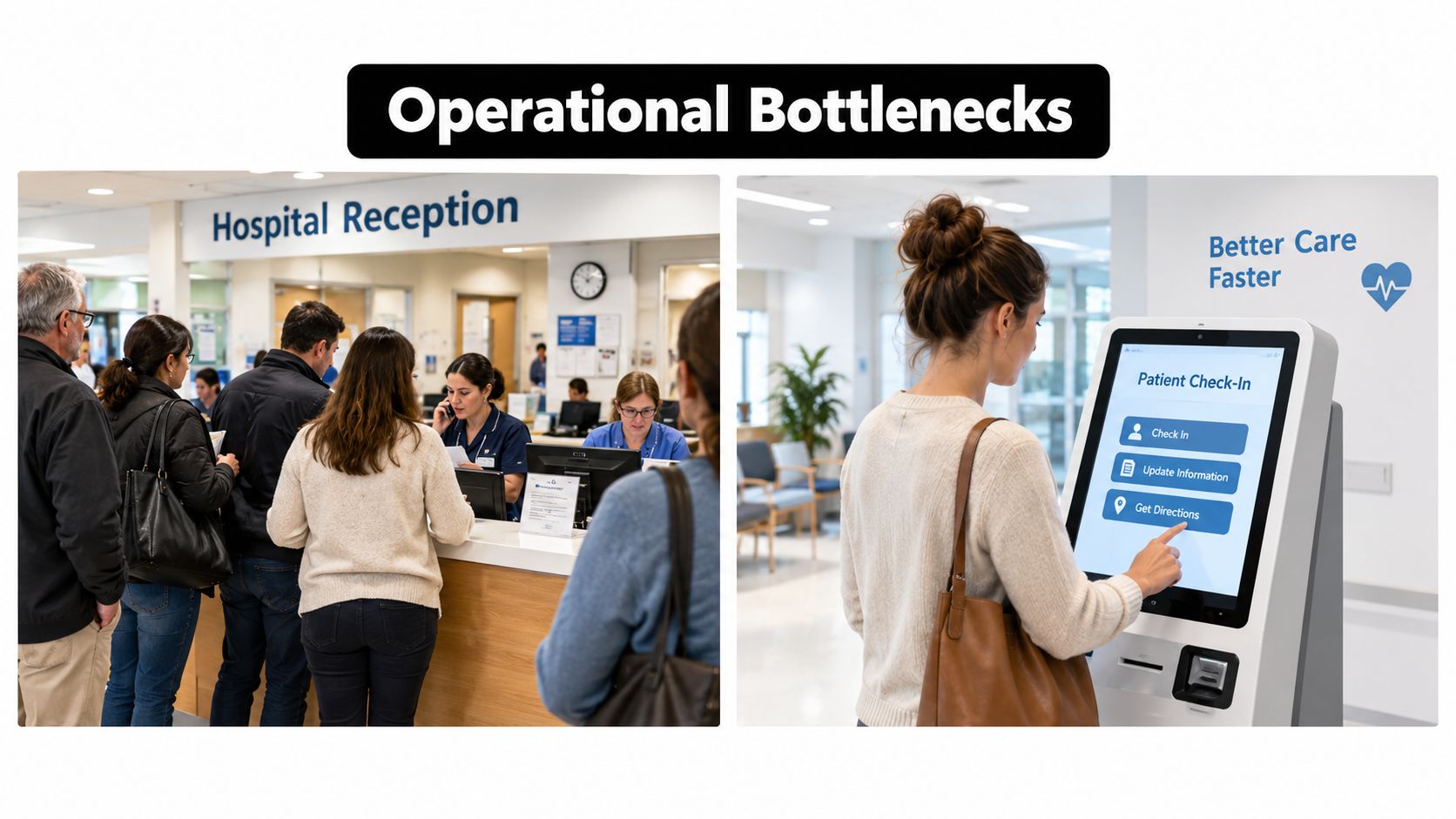
Consider a hospital check-in workflow. A patient uses a kiosk, the system validates identity and appointment data, and the workflow updates registration, notification, and queue systems. An exception, such as an unmatched record or missing insurance information, goes to staff rather than blocking every patient. The same architecture applies to more complex industrial environments, where the events arrive from vehicles, network equipment, buildings, or field devices.
Logistics and fleet operations
A logistics company may receive GPS, geofence, vehicle-status, delivery, and traffic-related events through separate systems. A data platform can standardize those events, preserve their history, and make the relevant state available to an agent or routing service.
When a vehicle approaches a restricted zone, the workflow might verify the delivery schedule, detect a route deviation, notify the dispatcher, and update the customer-facing status. The agent shouldn't invent a route without constraints. It should use approved routing services, respect vehicle and driver rules, and escalate a conflict when the available data doesn't support a safe decision.
The architecture typically separates ingestion from decisioning. Streaming or batch pipelines capture events, transformation layers create consistent business entities, and orchestration services trigger actions in transport management, mobile, customer, and billing applications. That separation improves observability because engineers can distinguish a missing event from a failed decision or an unavailable downstream system.
Telecom and energy operations
Telecom operators face a similar challenge with network equipment and service events. An Element Management System can produce alarms, performance signals, configuration changes, and maintenance records. A Snowflake-based data solution can retain those events at scale, correlate them with asset and service data, and provide the context needed for automated triage.
An agent might group related alarms, identify a probable fault domain, create a work order, and recommend a maintenance priority. The system should still enforce change controls and require an authorized engineer before a configuration change reaches production.
Energy and smart-building workflows add another dimension. Sensor readings, occupancy signals, equipment status, weather inputs, and maintenance schedules can inform automated decisions about heating, cooling, load management, and service alerts. The workflow needs time-series history because a single reading rarely explains whether equipment is behaving normally or drifting from its pattern.
For a deeper perspective on designing data platforms with a Snowflake ecosystem partner, see this Snowflake partner collaboration perspective.
These architectures work when the data model reflects operational reality. Define common identifiers for assets, sites, customers, work orders, and events. Track event time separately from ingestion time. Preserve raw records for investigation, then expose curated tables or services for automation. Without that discipline, an AI agent may be fast but contextually unreliable.
A short visual explanation can help teams connect the platform design to the operational workflow:
The point isn't to place every decision inside Snowflake or every action inside an agent. The point is to create a governed data and orchestration layer that lets each operational system do its job while automation coordinates the process across them.
Why Automation Tools Go Underutilized
Buying an automation platform doesn't create automation value by itself. Teams often select a tool before they understand the process, then reproduce an inefficient workflow in a more polished interface. The software works as configured, but the organization hasn't removed unnecessary approvals, clarified ownership, fixed data quality, or prepared users for the new operating model.
Recent industry coverage reports that more than 65% of global businesses had implemented some form of workflow automation in 2025, compared with 20% two years earlier.Workflow automation utilization coverage The same coverage says nearly 40% of respondents reported cost reductions of at least 25%, while 48% reported at least a 25% efficiency increase. Those figures show why adoption alone is a weak success measure. A company can own automation software, run pilots, and still leave substantial value uncaptured.
The wrong workflow is worse than no workflow
Good candidates usually have clear triggers, repeatable rules, meaningful volume, stable system interfaces, and a measurable business outcome. Poor candidates often depend on undocumented judgment, unreliable source data, changing policies, or a large number of unusual exceptions.
Before automating, ask:
- Is the process worth preserving? Remove redundant approvals and duplicate data collection before encoding them.
- Can the team define success? Choose a metric such as cycle time, cost per transaction, error rate, or first-time completion.
- Where does the data originate? Assign a system of record and document how each downstream system receives updates.
- What happens when data is missing? Design the exception route instead of allowing silent failure.
- Who owns the result? Name a business owner who can change the process when policy or operating conditions change.
A workflow may be technically elegant and still fail if employees bypass it. Workarounds usually signal that the automated path does not match how people complete the work. Involve the users who handle exceptions, show them how the workflow affects their responsibilities, and make manual intervention an explicit part of the design rather than pretending it won't occur.
Process redesign creates the return
Automation should expose friction, not hide it. If five systems hold slightly different customer identifiers, connecting them without a shared data model can increase reconciliation work. If an approval exists only because no one trusts the previous step, improving validation may eliminate the approval entirely.
Underutilization also comes from fragmented ownership. IT may manage the platform, operations may own the process, security may control access, and finance may approve the budget. Without a shared outcome and a clear operating owner, each group optimizes its own concern while the end-to-end process remains slow.
The differentiator is therefore not whether an enterprise has an automation license. It's whether leaders have selected the right workflows, redesigned them around reliable data, and built adoption into the implementation plan. Software is the execution layer. Process judgment determines whether the execution matters.
Building Your Automation Roadmap
A practical roadmap begins with an inventory, not a platform demo. List the workflows that create the most delay, manual effort, customer friction, rework, or compliance exposure. Follow each one from trigger to final outcome, including email handoffs, spreadsheets, approvals, system updates, and exception paths.
Start with an evidence-based shortlist
Rank candidates against a small set of criteria:
- Business impact: Estimate the cost of delay, manual handling, errors, and missed service commitments.
- Process stability: Separate repeatable workflows from processes that are still changing every week.
- Data readiness: Identify the source of truth, missing fields, duplicate identifiers, and access constraints.
- Integration feasibility: Confirm that CRM, ERP, finance, operational, and legacy systems can exchange the required data.
- Risk level: Decide which actions can run automatically and which require approval or human review.
- Adoption effort: Include training, role changes, support, and the likely workarounds users may create.
Choose a workflow where the outcome is visible and the control path is manageable. An invoice approval, employee onboarding sequence, service-ticket route, or fleet exception process can provide a clearer starting point than a broad objective such as “automate operations.”
Build the data and control foundation
A Snowflake-centered architecture can serve as a governed analytical and operational context layer, but it needs deliberate modeling. Define canonical entities, event schemas, ownership, lineage, and retention rules. Keep raw source records available for investigation, and create curated views that agents and downstream workflows can use safely.
Then implement the execution controls. Log every trigger and action, apply least-privilege access, make failed steps visible, and provide replay or rollback procedures where the connected systems support them. Set an approval threshold for sensitive actions and test unusual conditions before production release.
Technology leaders may use an internal team, a platform integrator, or a specialized engineering partner. Faberwork LLC provides custom software, Agentic AI workflow automation, test automation, and Snowflake-centered data solutions through its technology services, which is one model for bringing application, data, and automation engineering together.
Scale by measured learning
Launch with a controlled workflow and compare results against the baseline. Review cycle time, touch count, exception volume, data quality, user adoption, and downstream effects. A successful pilot should produce a reusable pattern for identity, logging, permissions, monitoring, testing, and human escalation.
Implementation advice: Scale the architecture only after the first workflow proves that the organization can operate, govern, and improve it.
The benefits of workflow automation compound when each new workflow reuses trustworthy data models and control patterns. They disappear when teams deploy disconnected bots that no one owns. Enterprise leaders should treat automation as a continuing capability, supported by process redesign, data architecture, engineering discipline, and operational accountability.
If your organization is evaluating automation in logistics, energy, telecom, healthcare, or finance, start by selecting one high-volume workflow and documenting its current trigger, data path, manual touches, exceptions, and measurable cost. Then engage an experienced engineering partner to test the business case, design the Snowflake data foundation, and deploy an Agentic AI workflow with the permissions, audit trail, and human controls required for production.


