
Your claims team has agents reading documents, checking policy rules, and drafting replies. Each demonstration looks convincing. But when a claim moves toward payment, nobody's certain which agent has the latest information, whose recommendation wins, or who authorizes the payout.
That's the enterprise challenge behind agentic AI orchestration. The goal isn't to make agents busier. It's to make their combined work accountable, recoverable, and measurably better than the process you already run.
What Agentic AI Orchestration Means in Plain Terms
Say a claims specialist receives an incomplete application. A document agent extracts the claimant's details, a policy agent checks coverage, and a correspondence agent prepares a response. Without coordination, the correspondence agent might promise coverage before the policy check finishes.
Think of an orchestra. Each player may be skilled, but the conductor determines when they enter, how they respond to one another, and when everyone stops. Enterprise agents need equivalent controls, especially when their actions affect money or customer records.
Agentic AI orchestration is the coordination layer that assigns goals to AI agents, sequences their actions, controls the tools and data they touch, and escalates decisions to people.
A shared workflow gives the team a concrete way to plan those responsibilities.

From answering questions to completing work
A chatbot can explain a policy clause. An orchestrated system can retrieve the relevant policy, compare submitted evidence, request missing documents, update the claims application, and send an approved response. Its output is a completed business process, not just an answer.
That distinction explains why orchestration deserves architectural attention. In a 2025 global enterprise AI survey summarized by SS&C Blue Prism, 94% of respondents considered process orchestration essential to successful AI deployment, while 69% of AI projects never reached live operational use.
Those findings don't prove that orchestration alone solves deployment problems. They underline the distance between a convincing demonstration and a dependable operational service.
For the claims team, the conductor must also resolve disagreement. If the document agent identifies one policy version and the coverage agent uses another, neither should proceed just because its answer sounds confident.
Use this test: Can your agents hand off work, see the relevant shared state, and stop safely? If they can't, you have agents, but not dependable orchestration.
Core Components That Make Orchestration Work
A working design needs more than a planner connected to a language model. It needs distinct responsibilities for deciding, executing, remembering, authorizing, and inspecting work. Keep these responsibilities separate enough that you can change an agent without rebuilding the whole process.
Core components of an orchestration system
ComponentWhat It DoesLogistics ExamplePlanner or supervisorTurns a goal into ordered subtasks with dependenciesDispatch planner splits a late-shipment fix into rebooking and customer noticeSpecialist agentsEach owns one skill and one set of toolsCarrier-rates agent compares three freight optionsTool and API connectorsLet agents read and act in business systems within approved actionsConnector posts a rebooking to the transport management systemShared stateRecords completed steps, pending tasks, and the data version usedShared state shows the rebooking is pending and which rate table version was usedPolicy and permission gatesDefine what each agent may read, write, or approveAgent can propose a reroute but cannot confirm a cost above a set limitMonitoring and audit trailLogs every call, timing, output, and decision for replayLog shows which agent changed a delivery window and why
Make the interfaces explicit
The planner should produce an actionable task specification, not a vague request to fix a shipment. Give the carrier-rates agent the shipment identifier, delivery constraints, permitted carriers, and expected response format. Its output should distinguish a quoted option from a confirmed booking.
Tool design deserves the same precision. When defining callable actions, NotFair tools documentation is a useful implementation reference to consult alongside your connector specifications. Document each tool's inputs, authorization requirements, side effects, and failure responses.
Keep shared state separate from conversational history. A long message thread isn't a dependable record of whether a booking succeeded. Store explicit statuses such as proposed, approved, submitted, confirmed, and failed, with identifiers that connect them to the business transaction.
Likewise, don't confuse an audit trail with unrestricted storage. Capture the evidence needed to reconstruct a decision while applying access controls and retention rules to sensitive payloads.
This week, inventory these components in your current pilot. Mark each as implemented, partial, or missing, and assign an owner to every gap. Prioritize missing authorization, state, and recovery capabilities before adding more specialists.
How an Orchestrated Workflow Runs, Step by Step
Consider a supplier invoice that doesn't match its purchase order. The desired outcome is a resolved discrepancy with an accountable disposition, not merely a generated explanation.
Map the transaction before choosing which agents will handle it.
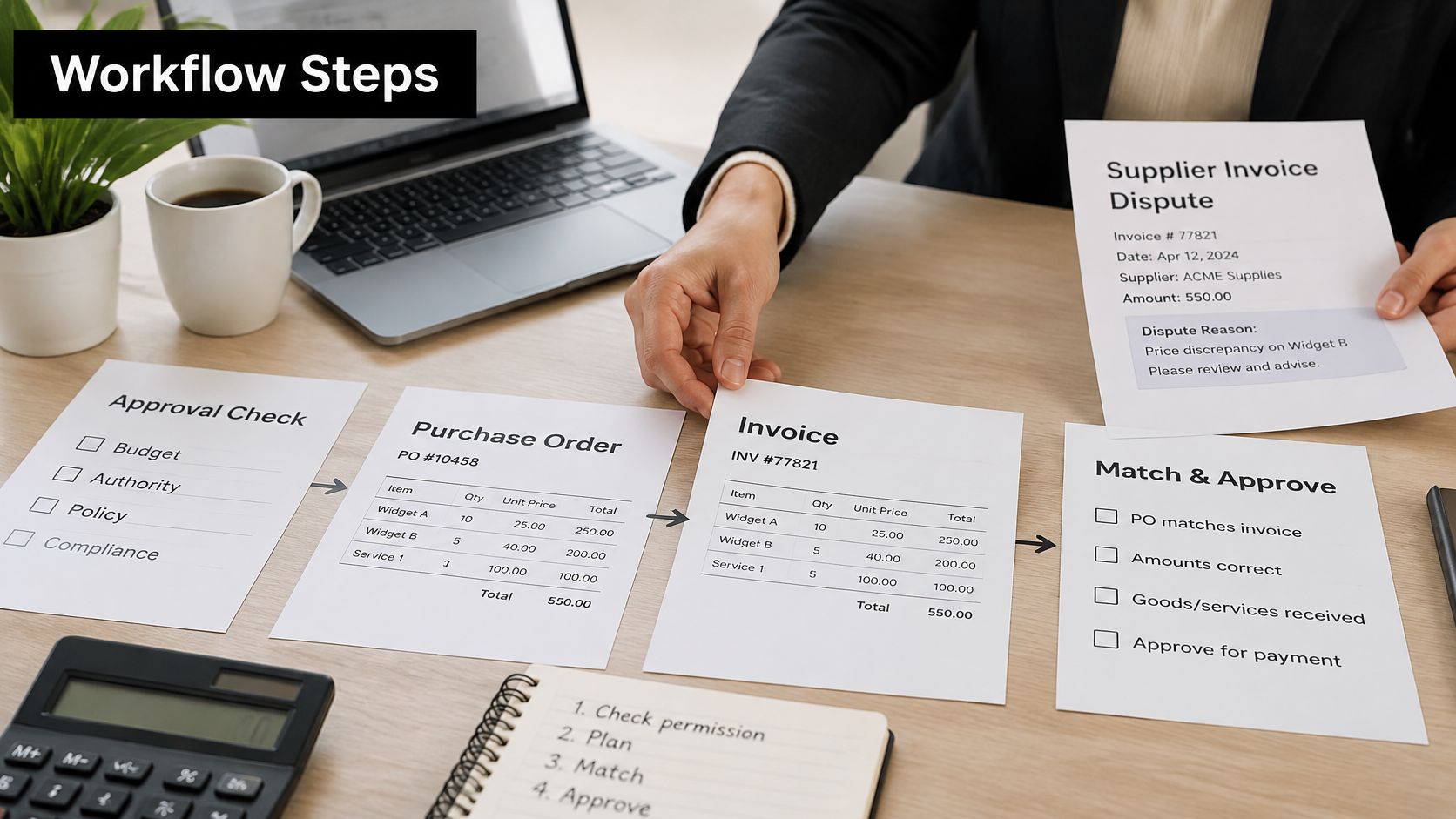
- Receive the goal and verify access. Confirm that the requester may inspect the supplier account and initiate reconciliation, so the workflow doesn't inherit authority merely from a submitted prompt.
- Decompose the request. The planner identifies document extraction, purchase-order retrieval, receiving-record retrieval, comparison, and disposition, marking which tasks depend on earlier results.
- Delegate with contracts. Route each task to a specialist with defined inputs and an expected output, such as invoice lines paired with document references rather than unsupported prose.
- Schedule independent work concurrently. Fetch the purchase order and receiving record in parallel, but hold the discrepancy decision until both are available.
- Validate at each handoff. Check identifiers, currencies, required fields, and supporting evidence before another agent consumes the result, preventing a plausible extraction error from becoming an approved adjustment.
- Persist actions and transitions. Write tool results and state changes to the shared log as execution proceeds, so an interrupted run can resume from a known checkpoint.
- Escalate consequential decisions. Route variances beyond the configured threshold and irreversible payment actions to an authorized approver, with the evidence attached.
- Return the disposition and measure it. Report whether the invoice was matched, corrected, rejected, or escalated, and distinguish completed resolution from work still waiting on someone else.
Optimize elapsed time, not just answers
Scheduling matters even when an agent chooses appropriate tools. The 2026 TPS-Bench study reported that GLM-4.5 achieved a 64.72% completion rate, but its extensive sequential tool calls lengthened execution time.
That benchmark isn't a forecast for your invoice process. Its architectural lesson is to represent dependencies explicitly instead of expecting a model to infer efficient scheduling every time.
Set timeouts for unavailable systems and record elapsed time by step. Compare completion quality, tool-call count, and end-to-end latency together. A fast response that leaves the invoice unresolved isn't a successful outcome.
Use the accompanying video as another discussion prompt when reviewing workflow execution with your team.
Draw the dependency graph for a workflow you own. Identify which branches can run concurrently and which must wait for verified evidence or approval.
Architectural Patterns and Where Each One Fits
An orchestration pattern determines who holds control. It isn't a product choice, and selecting a framework doesn't settle ownership, sequencing, or failure containment.
For an initial enterprise workflow, supervisor-worker is a practical default because a central coordinator gives operators a clear place to inspect decisions. Choose another shape when domain ownership, event volume, or measured latency makes that central arrangement unsuitable.
Orchestration patterns compared
PatternHow Work FlowsEnterprise FitMain Trade-offSupervisor-workerOne orchestrator assigns subtasks to specialists and merges resultsInvoice reconciliation across ERP and emailThe supervisor becomes a single point of failureSequential pipelineEach agent passes its output to the next in a fixed orderCustomer onboarding checks in bankingSlow when steps could run in parallelHierarchical teamsSupervisors manage sub-supervisors, each owning one domainNetwork operations split by telecom regionCause is harder to trace across levelsPeer-to-peer meshAgents message each other directly without central controlFleet rerouting negotiated between depotsConflicts are hard to resolve and auditEvent-drivenAgents react to events on a shared bus when conditions matchBuilding alarms that open maintenance ticketsDuplicate and out-of-order events need explicit handling
Choose the trade-off deliberately
With supervisor-worker, keep the coordinator recoverable. Persist its decisions outside the running process so a restart doesn't erase outstanding work. Central control is easier to inspect, but a stalled supervisor mustn't strand every specialist.
A sequential pipeline suits ordered checks. Don't force unrelated checks into that order because a diagram looks cleaner. In a hierarchy, give regional or functional supervisors explicit boundaries and preserve a common transaction identifier across levels.
A peer-to-peer mesh gives depots room to negotiate, but direct messaging doesn't establish who can commit a route change. Without a designated decision authority, agents can exchange reasonable proposals indefinitely or make incompatible commitments.
For event-driven building operations, distinguish an alarm from a maintenance obligation. Repeated alarm messages shouldn't create repeated tickets. Faberwork's smart-building AI success story provides relevant application context, but an event-driven orchestration design still needs explicit delivery and acknowledgement rules.
Practical rule: Choose the simplest pattern that meets your latency and ownership requirements. Add another only when a measured requirement remains unmet.
Name the failure you most fear: a blocked coordinator, an untraceable decision, conflicting updates, or repeated actions. That answer identifies the trade-off you need to manage, rather than the architecture that looks most advanced.
Choosing an Orchestration Platform
Choose the platform after defining the workflow and control requirements. Otherwise, your team risks adapting the business process to whichever demonstration looked most complete.
In a 2025 survey of U.S. IT executives at companies with more than $1 billion in revenue, 87% considered interoperability between AI technologies essential or significant, according to UiPath's agentic AI report. The report also identified security, implementation cost, and integration with existing systems as leading concerns.
In a 2026 survey of IT decision-makers, 74% prioritized integration with existing applications, 63% prioritized orchestration across systems, and 62% wanted the ability to change models, vendors, or platforms, according to OutSystems.
Turn selection criteria into pilot tests
- Can it connect to the actual systems? Test a representative read and controlled write through the connectors your workflow needs.
- Can you change the model independently? Swap a specialist's model while preserving the planner interface, tool contracts, and state store.
- Can operators inspect execution? Reconstruct a failed transaction using per-step timing, cost attribution, and audit records.
- Are policies outside the prompts? Attempt a prohibited action and verify that an enforcement layer rejects it.
- Do escalation and rollback work? Interrupt execution after a partial change and test the defined recovery path.
For security-focused comparisons, ThreatExploit AI's SOAR guide is a useful companion when examining response coordination and operational controls. Keep those criteria tied to your enterprise workflow rather than assuming security orchestration and business-process orchestration are interchangeable.
A claims team might begin with one document-reading model, then replace it without rewriting its policy-system connectors. Test that substitution before committing, and compare total integration and operating cost, not just the licence price.
Connecting Orchestration to Data and Snowflake
An agent can make a well-reasoned decision from the wrong information. Treat data freshness, ownership, and access as design requirements, not cleanup work after connecting the agents.
Snowflake can serve as the governed analytical record behind a workflow. It doesn't automatically become the authority for every operational action: a maintenance platform may still own ticket status, while an equipment controller owns the current operating setting.
Follow an HVAC signal into action
Consider a hypothetical building workflow. Equipment sensor readings arrive in Snowflake, and an anomaly rule flags a chiller drifting outside its normal operating band. The orchestrator retrieves the equipment identity, recent readings, and maintenance history.
A maintenance agent prepares a ticket. Before scheduling a technician, the supervisor checks the last 14 days of energy-use data in this example to distinguish persistent drift from a brief operating change. If readings are missing or the asset identifier doesn't match, the workflow requests investigation rather than presenting a confident diagnosis.
At Faberwork, we helped build intelligent software to analyze HVAC data using time-series data with Snowflake. The HVAC time-series case study provides context for that data foundation; the agent workflow above is an illustrative architecture, not a claim about the deployed system.
Establish data contracts before agent access
Apply clear integration rules:
- Query approved views. Expose the equipment, site, and customer fields required for the task through role-based views, rather than granting broad raw-table access.
- Version retrieved documents. Preserve effective dates and retrieval timestamps for manuals, contracts, and maintenance procedures so recommendations can be traced to the content used.
- Control write-backs. Submit changes through authorized tasks or application APIs, with recorded inputs and results that operators can reconstruct safely.
Separate replaying evidence from repeating an action. Reconstructing why a ticket was opened mustn't open another ticket.
Before connecting an agent, audit every source for a named owner, a freshness timestamp, and a role-based view. Also define what happens when freshness expires. A visible stale-data exception is more useful than a completed workflow built on untrustworthy state.
Governing Agents, Conflicts and Failures
OrchestraBench proposes controlled failure injection for enterprise workflows and measures cascade radius, time to detection, and recovery completeness, among other metrics. These measures address a risk that aggregate success rates can conceal: a wrongly delegated task or uncontained tool error can affect dependent agents.
The governance gap is substantial. Deloitte's multinational research found that only 21% of enterprises reported mature agentic AI governance, while roughly 80% lacked mature capabilities such as decision boundaries, real-time monitoring, and complete audit trails.
Decide how disagreements end
Define conflict protocols before launch:
- Authoritative-source selection. Specify which system governs each field when agents disagree, including what to do when the authoritative source is unavailable.
- Workflow priority. Establish which obligation wins when workflows compete, such as safety restrictions taking precedence over delivery optimization.
- Transaction locks. Prevent competing agents from committing changes to the same record using incompatible versions.
- Escalation and rollback. Identify when negotiation stops, who decides next, and which completed changes can be reversed.
- Human approval. Require an authorized person to approve irreversible actions with the relevant evidence visible.
Suppose dispatch and fuel-optimization agents both reroute the same truck. A lock prevents simultaneous commitments, while a priority rule determines which proposal may proceed. The losing proposal must be refreshed against the committed route, not retried against stale state.
A conflict isn't resolved because one agent stopped responding. It's resolved when the system records an accountable decision and leaves the business record consistent.
Contain errors and prove recovery
Validate inputs and outputs at agent boundaries. Use bounded retries with idempotency keys, which let a receiving service recognize repeated submissions, and circuit breakers that pause calls to repeatedly failing tools. Don't retry an uncertain payment or booking until you establish whether the original action succeeded.
Assign an owner to each specialist and preserve the event trail across Snowflake queries, customer systems, and operational APIs. Track cascade radius and detection time alongside business KPIs, then inject dependency failures before deployment to verify that recovery completes.
At Faberwork, we apply Kaizen and continuous-improvement practices to iterative software and AI delivery. Make that discipline concrete in sprint reviews: inspect failure logs, identify the business consequence, and tighten a control without changing unrelated behavior.
Confirm Your Orchestration Design Before You Build
A useful pilot answers an operational question: can this coordinated system produce a better business outcome under realistic constraints? It shouldn't exist merely to demonstrate that agents can call tools.
Make these decisions before implementation:
- Choose the first workflow. Select a bounded process with a clear beginning, an observable finish, and an accountable business owner.
- Select the control pattern. Match coordination to latency requirements and decision ownership, including who handles exceptions.
- Define data and permissions. Identify the sources, permitted actions, and conditions that require the workflow to stop.
- Specify evidence of success. Establish a human baseline and acceptance criteria for quality, elapsed time, cost, and recovery.
Starting narrowly reflects current deployment patterns. McKinsey's 2025 global survey of 1,993 respondents found that 23% of organizations were scaling an agentic AI system in at least one function, while no individual function exceeded 10% reporting scaled agent use.
Measure outcomes rather than activity
Define cost per completed outcome using model, tool, infrastructure, and human-review costs, including unsuccessful attempts. Keep pending escalations out of the completed-outcome count until the business process reaches its agreed finish.
Compare representative tasks against the human baseline, including incomplete records, conflicting evidence, and unavailable dependencies. Record recovery time and cascade radius, and classify failures by model output, retrieved context, data freshness, API behavior, policy logic, or handoff. Expand only when reliability and measurable value justify it.
Book a workflow design review with Faberwork LLC. Bring a process map, the component inventory, representative exceptions, and your proposed success metrics so we can decide whether a pilot is justified. We offer AI advisory, use case practices, AI model development and deployment, and custom enterprise AI solutions built on multiple tools and frameworks.


